Lorem ipsum dolor sit amet, consectetur adipiscing elit. Ut elit tellus, luctus nec ullamcorper mattis, pulvinar dapibus leo.
Lorem ipsum dolor sit amet, consectetur adipiscing elit. Ut elit tellus, luctus nec ullamcorper mattis, pulvinar dapibus leo.
Lorem ipsum dolor sit amet, consectetur adipiscing elit. Ut elit tellus, luctus nec ullamcorper mattis, pulvinar dapibus leo.
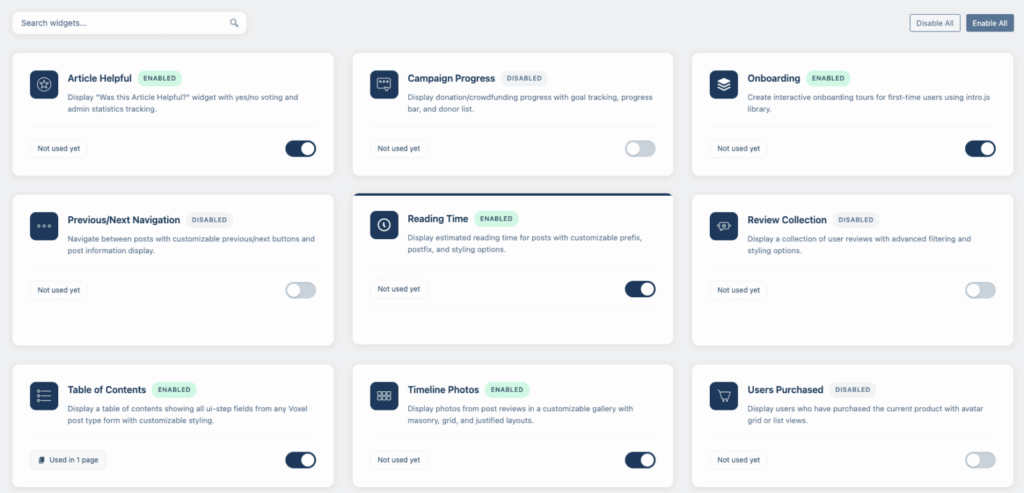
Select a category to view what functions and widgets are available.
Show the currently active filters with a clear button.
https://docs.stripe.com/api/coupons/object
Pinterest, SMS, Line, Snapchat, Bluesky, Email, Viber, Threads
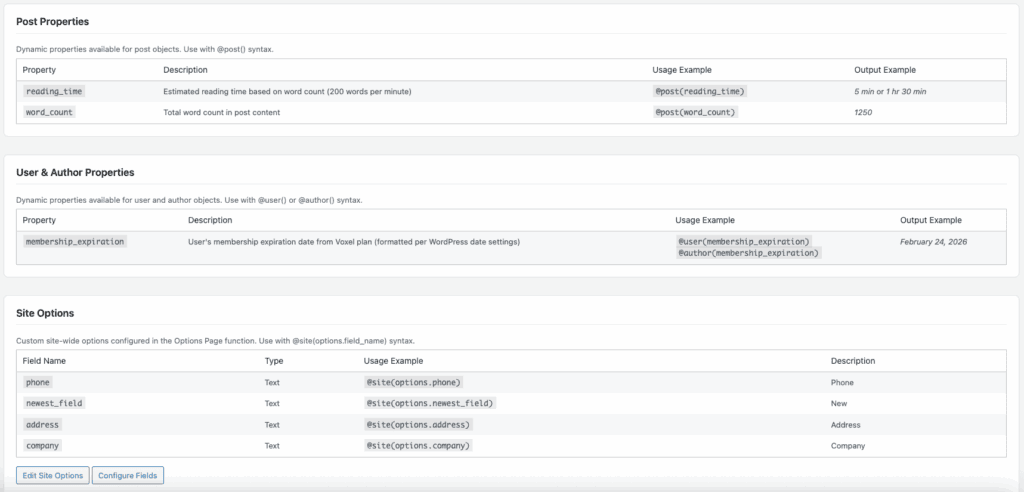
Extract specific component from address field
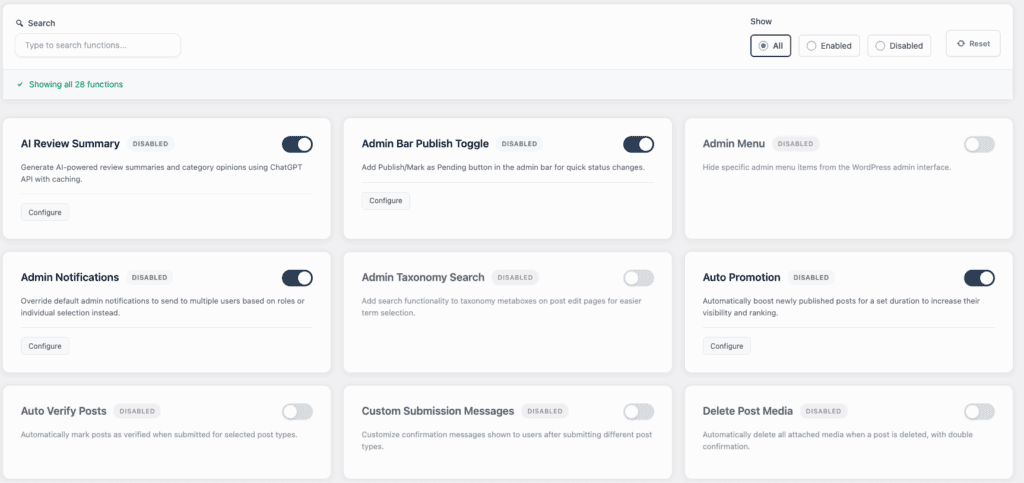
Add Publish/Mark as Pending button in the admin bar for quick status changes.
Hide specific Voxel admin menu items from the WordPress admin interface.
Override default admin notifications to send to multiple users based on roles or individual selection instead.
Add search functionality to taxonomy metaboxes on post edit pages for easier term selection.
Generate AI-powered review summaries and category opinions using ChatGPT API with caching.
similar to Facebook comment summary it will insert a summary of the comments on the timeline post. Injecting into below the post. Activate after 2??? replies?
There are no results matching your search Reset filters?
Choose the plan that fits your needs. All plans include updates and support.
Choose the plan that fits your needs. All plans include updates and support.
There are no results matching your search
There are no results matching your search
There are no results matching your search
### Route Planner
– **Two-Finger Gesture on Mobile** – Map now requires two-finger gestures to pan on touch devices, so single-finger swipe scrolls the page normally instead of trapping the user; shows a brief “Use two fingers to move the map” overlay on single touch; uses native cooperative gestures for Google Maps, cooperativeGestures API (with fallback) for Mapbox, and a manual handler for Leaflet/OSM; toggleable in Elementor, enabled by default
### Image Optimization
– **Fix Ghost Upload Slot in Media Library** – Rewrote plupload integration to swap file content in-place on the existing plupload File object instead of removing/adding queue entries; the old approach broke WordPress’s internal file-to-attachment mapping, causing a second upload slot that stalled at ~20% and required re-selecting the image
### Listing Plan Notifications
– **New Function** – Send email notifications to users when their individual listings are approaching expiration (based on `voxel:listing_plan` user meta with `fixed_days` expiration mode); supports per-listing dedup, 7 dynamic tags (`{listing_title}`, `{expiration_date}`, `{remaining_days}`, `{plan_name}`, `{post_type}`, `{amount}`, `{currency}`), test emails, and manual trigger with stats
### Saved Search Widget
– **Notification Button Active State** – Notification toggle button now reflects Elementor Active tab styles (background, icon color, border) when notifications are ON, not just on click
– **Filter Tags Text Color Fix** – Text Color control under Filter Tags now correctly applies to criterion values (was blocked by base CSS specificity)
### International Phone Input
– **Deferred XHR/Fetch Hooking** – XHR and fetch monkey-patches are now only installed when a phone input actually exists on the page, eliminating unnecessary string checks on every AJAX request site-wide (calendar, notifications, Cloudflare beacons, etc.)
– **Conditional Visibility Fix** – Fixed `@post(phone) Is not empty` always evaluating false when Advanced Phone Input is enabled; added render fallback to the dynamic data tag so bare `@post(phone)` returns the raw phone value
### Weather Widget
– **Localized Forecast Dates** – Forecast day names now respect the widget’s language setting using IntlDateFormatter (e.g., “pon., 16 lut” in Polish); falls back to English if the intl extension is unavailable
– **Forecast Humidity & Wind** – Forecast cards now show humidity and wind speed when those toggles are enabled (previously only shown on Current Weather view)
– **Translated Detail Labels** – “Humidity” and “Wind” labels are now translated across all 40 supported languages in both Current Weather and Forecast views
### Saved Search Widget
-Completely rewrote the Saved Search widget from the group up. Design stays the same, saved searches are not affected.
-Made updates to Routes Widget
### Saved Search Widget
– **Share Search Button** – Added a Share button to each saved search card that copies the search URL to the clipboard; includes Elementor toggle, custom label, success message, and icon controls
– **Action Button Hover & Active States** – Added Normal/Hover/Active tab controls for action button background, icon color, and border color styling
### AI Settings
– **Updated AI Model Lists** – Replaced outdated OpenAI models with GPT-5 Mini, GPT-5.2, GPT-5 Nano, and o4-mini; replaced outdated Anthropic models with Claude Haiku 4.5, Sonnet 4.5, Sonnet 4, Opus 4, Opus 4.5, and Opus 4.6
### Saved Search Notifications
– **Double Email Fix** – Fixed users receiving two emails (one from Voxel async, one from batch processor) when email batching is enabled; Voxel’s async email is now properly suppressed even after admin config merge
### Weather Widget
– **Kelvin Units Fix** – Fixed “Error loading weather data” when Kelvin units selected by mapping to the correct OpenWeatherMap API parameter
### Image Optimization
– **WebP Upload Inflation Fix** – Fixed client-side optimization inflating WebP files by re-encoding through canvas; same-format files that don’t need resize or watermark now skip the canvas pipeline entirely, preserving original file size
– **Size Comparison Fallback** – Added safety net that keeps the original file when canvas re-encoding produces a larger result (e.g., resize/watermark applied but output is still bigger)
– **Keep Original Name Fix** – Fixed “Keep original name” filename format still appending counter and session suffix (e.g., `-01-djsv`); now preserves the original filename with only the extension changed when format conversion occurs
### Table of Contents Widget
– **Repeater Field Completion** – Fixed repeater fields not showing green completion indicator when items are added
– **Conditional Field Visibility** – Fixed conditional fields still appearing in TOC when their conditions aren’t met; TOC now syncs with form visibility
### AI Post Summary
– **Increased Max Token Limit** – Raised the maximum token limit from 1,000 to 5,000 for longer AI-generated summaries
### Show Field Description
– **Repeater Child Description Fix** – Fixed child field descriptions (e.g., image field) incorrectly appearing on parent repeater fields that have no description
### Dynamic Tags
– **Address Part City Fix** – Fixed `address_part(city)` returning state/county instead of city for Polish and other addresses by adding fallbacks for `sublocality`, `sublocality_level_1`, and `administrative_area_level_3` (municipality/gmina) before falling back to `administrative_area_level_2` (county)
Many more bug fixes that are misc.
### Pending Suggestions Widget
– **Added Accepted Status Filter** – Status dropdown now includes All, Pending, Queued, and Accepted options
– **Show Accepted in All View** – Accepted suggestions now display when “All” filter is selected
– **Accepted Status Badge** – Added green status badge for accepted suggestions
### Translations
– **Complete POT File Generation**
### Dynamic Tags
– **Address Part Localization** – The `address_part` method now returns address components (city, country, etc.) in the site’s current language by re-geocoding with Google/Mapbox API; supports WPML, Polylang, TranslatePress, and WordPress locale with 24-hour caching
### External Link Warning
– **Modal Border Radius Setting** – New setting to customize modal border radius (was hardcoded to 12px)
– **Overlay Background Setting** – New setting to customize the overlay/backdrop color
– **CSS Variables for All Styling** – All modal styling now uses CSS variables; no more hardcoded values
### AI Bot
– **Localized UI Messages** – “No results”, “error”, “rate limit”, and “login required” messages now respect the AI Response Language setting (supports 15 languages including Russian, Ukrainian, Polish, Arabic, Japanese, Chinese, etc.)
– **Improved Taxonomy Search** – Schema now includes `taxonomy_name` for taxonomy/term fields so AI knows the correct WordPress taxonomy to use with `_taxonomy:` filter
– **Better Taxonomy Hints** – Field hints now explicitly tell the AI to use `_taxonomy:taxonomy_name` format with term slugs
### Schedule Posts
– **Native Date Input** – Eliminates z-index/positioning issues.
– **Translated Sites Fix** – Fixed scheduling field incorrectly appearing on confirmation page for translated sites
### Load Search
– **Hide When Empty** – Load Search button now automatically hides when user is logged out or has no saved searches
### Phone Field
– **New Caledonia Missing** – Added New Caledonia to backend country selection list (was only available on frontend)
### Admin Notifications
– **Individual Users Fix** – Fixed individual users not receiving email notifications due to type mismatch
### Online Status
– **Display Location Settings Fix** – Fixed “Display Locations” checkboxes not saving when unchecked; messenger/inbox/dashboard toggles now work correctly
– **Notification Avatar Fix** – Fixed avatars becoming square in notification popup when Online Status is enabled
### App Events
– **Admin Page Crash Fix** – Fixed PHP Fatal error on Voxel App Events admin page caused by `dynamic_tags()` methods returning arrays instead of proper data group instances
### Active Filters Widget
– **AJAX Label Fix** – Fixed filter labels showing field key (e.g., “terms”) instead of field label (e.g., “Category”) during AJAX search; labels now read from Voxel’s Vue search form at runtime
### Saved Search
– **Improved Notification Reliability** – Fixed timing issue where notifications could fail when admins publish posts from wp-admin; now uses deferred processing at request shutdown to ensure all post data is saved before matching
### Suggest Edits Improvements
– **Hierarchical Taxonomy Display** – Taxonomy fields in the suggest edit modal now display with proper parent/child hierarchy using indentation
– **Checkbox List UI for Multi-select** – Replaced native `<select multiple>` with a scrollable checkbox list featuring circle/checkmark indicators for clearer selection state
– **Pre-fill with Current Values Toggle** – New Elementor control to pre-populate multi-select fields with current values, allowing users to add or remove items without re-selecting everything
– **Admin Display Fix** – Taxonomy and select field suggestions now show labels instead of IDs in the admin suggestions table
– **Template Editor Fix** – Fixed “Fields to Show” dropdown showing empty when editing Elementor templates
### Schedule Posts Fixes
– **Pikaday Calendar Fix** – Fixed calendar not displaying by loading Pikaday directly from Voxel theme
– **CSS Loading Fix** – Fixed stylesheet not loading due to hook timing issue
– **Inline Layout** – Date and time inputs now display side-by-side as intended
– **Consistent Styling** – Time input now matches date selector height (44px)
### Image Optimization
– **Watermark Opacity Control** – New setting to adjust watermark transparency (0-100%) for both text and image watermarks
– **Translation Support** – Toast notifications and messages are now translatable via Loco Translate and similar plugins
– **Elementor Media Library Support** – Image optimization now works with Elementor image widgets, Gutenberg blocks, and WordPress Media Library uploads
### Social Proof
– **Translation Support** – Time ago strings (minutes, hours, days, ago) are now translatable for boost events
### Saved Search
– **Alert Width Fix** – Fixed alert popup text overlapping when using translated languages (e.g., Polish)
### Admin Columns
– **Verification Status Column** – New column type showing post verification status with configurable labels, custom icon support, and show/hide toggles for icon and text
### Add Category
– **Elementor Styling Fix** – Fixed form input styling controls not applying in Elementor editor
– **Translation Support** – Added all frontend strings to POT file for translation (Add new, Term name, etc.)
### Messenger Widget
– **Input Text Color Default** – Set default input text color to black for better visibility
### Promotion Create Form
– **Package Icons Fix** – Custom SVG icons from promotion package settings now display correctly in the create form
– **Duration Color Control** – New Elementor color control for styling the duration text independently from other card elements
### Bulk Resize
– **WebP Format Conversion** – Bulk resize now converts images to WebP based on the optimization mode setting, even for images that don’t need resizing
– **Warning for Larger Files** – Shows warning icon with tooltip for images that increased in size after conversion
– **Backup Original Files** – New option to keep original images in a backup folder (wp-content/uploads/vt-originals/) instead of deleting them during WebP conversion
– **Delete Originals Button** – Backup Management card shows file count and size with a delete button requiring “confirm” input for safety
### Added
– **Coupon Manager Widget**: New Elementor widget for creating and managing Stripe coupons. Features include:
– Create percent-off or fixed-amount discount coupons
– Set duration (once, repeating, forever)
– Optional restrictions: max redemptions, expiration date, minimum order value, limit to specific customer email, first-time customers only
– View list of coupons created by the current user
– Delete coupons
– Automatic Stripe provider check (widget only displays when Stripe is enabled)
– **Open Now Search Order**: New search order option to sort listings by open/closed status based on work hours field. Features include:
– Open listings appear first (or closed first if reversed)
– Configurable work hours field selector
– **Pin Timeline Post**: Allow post authors to pin a timeline post to the top of their post’s timeline feed. Features include:
– “Pin to Top” / “Unpin” action in post dropdown menu (visible only to parent post author)
– Pinned badge displayed on pinned posts
– Pin icon next to the actions button on pinned posts
– Pinned post automatically moves to top of timeline (below filters)
– Per-widget toggle to enable/disable pin functionality in Timeline widget settings
– Styling controls in Timeline Style Kit widget
– **Checklist Field**: New custom post field type for creating checklists with title (optional) and description per item. Features include:
– Configurable permissions (post author only or any logged-in user)
– Check scope options (global shared or per-user tracking)
– Drag-and-drop reordering of items
– Timestamp recording when items are checked
– App event triggered on item check
– Dynamic tags for completion percentage
– Full Elementor widget for frontend display with progress bar, styling controls
– Create Post (VX) widget styling controls for checklist cards, inputs, icons, and buttons
– **AI Bot Location Awareness**: AI Bot now understands “near me” queries using browser geolocation, visitor location cookie, or IP-based fallback
– **AI Bot Taxonomy Filtering**: Enhanced search with complex taxonomy filters (contains, doesn’t contain, has, does not have, empty, not empty)
– **AI Bot Comprehensive Search**: Added `_search_all` filter for searching across all fields, taxonomies, and content
– **AI Bot Quick Actions Toggle**: New setting to enable/disable quick action buttons (Directions, Call, View) below result cards
– **AI Bot Thinking Text**: New setting to customize the “AI is thinking” loading message
– **AI Bot Chat Window Mode**: New display mode option for Messenger Integration. When enabled, clicking the AI Bot circle in messenger opens a chat window instead of the sidebar panel:
– Chat window matches messenger chat styling
– Includes welcome message, message bubbles, and result cards
– Conversation persists within the chat window session
– **AI Response Language**: New global setting in AI Settings tab to configure the response language for all AI features (29 languages supported).
– **Telnyx SMS Provider**: New SMS provider option with API v2 Bearer token authentication
– **Solapi SMS Provider**: New SMS provider for Korean market with HMAC-SHA256 authentication
– **External Link Warning Button Styling**: Added button styling controls for the External Link Warning modal:
– Border radius control (0-50px)
– Border width control (0-10px)
– Individual border colors for Continue and Cancel buttons
– Sticky live preview that follows scroll in settings page
– **Saved Search Widget Styling**: Comprehensive styling enhancements for the Saved Search widget:
– Template selector: Detailed (filter tags) or Simple (filter summary)
– Show/hide controls for Search, Notification, and Delete action buttons
– Filter Tags styling: border width/color/style, 4-corner border radius, gap, icon color/size, box shadow
– Filter Summary styling section for Simple template
– **Visitor Location Latitude/Longitude Tags**: New dynamic tags for visitor coordinates:
– `@site(visitor.latitude)` – Visitor’s latitude
– `@site(visitor.longitude)` – Visitor’s longitude
– **Schedule Posts**: Allow users to schedule posts for future publication from the Create Post form. Features include:
– Toggle to enable/disable in Create Post (VX) widget settings
– Date picker using Voxel’s native Pikaday calendar
– Time input for precise scheduling
– Uses WordPress native scheduling (post_status = future)
– Customizable submit button text when scheduling (default: “Schedule”)
– Customizable success message when scheduling (default: “Your post has been scheduled.”)
– Only works when posts would be published (not pending)
– **Post Relation Search**: Adds searchable dropdown to post relations filter in search forms.
– **Open New Chats in Window**: New Messenger setting to open message actions in chat windows. Features include:
– Toggle in Messenger Settings to enable the feature
– Intercepts “Message Post” and “Message Author” action clicks
– Opens a messenger-style chat window on the current page instead of navigating to inbox
– Displays post/user name and logo/avatar in chat header
– Users can compose and send messages directly from the chat window
– **Unread Notifications/Messages Dynamic Tags**: New dynamic tags for user notification counts:
– `@user(unread_notifications)` – Number of unread notifications
– `@user(unread_messages)` – Number of unread direct messages
– **Title Notification Badge**: New function to show unread counts in browser tab. Features include:
– Displays combined count in page title (e.g., “(3) My Site”)
– Real-time updates via configurable polling interval (default 15 seconds)
– Title flashing when new notifications arrive (when tab unfocused)
– Settings for poll interval, include notifications/messages, custom flash text
– Only active for logged-in users
– **Online Status**: Display online/offline status indicators for users. Features include:
– Green dot indicator for online users (active within timeout period)
– Automatic heartbeat tracking with configurable timeout (default: 3 minutes)
– Per-location toggles: Dashboard Menu, Voxel Inbox, VT Messenger Widget, Admin User Columns
– Dynamic tags: `@user(online_status)`, `@user(is_online)`, `@user(last_seen)` and same for `@author`
– Visibility rules: “User is online”, “Author is online”
– Admin columns: Online Status badge and Last Seen in Users list
– Only visible to logged-in users
– **Route Planner Travel Mode Toggles**: Individual toggles to enable/disable each travel mode button (Driving, Walking, Cycling, Transit)
– **Bulk Resize (VT)**: Server-side batch image optimization tool under Media > Bulk Resize. Features include:
– Filter options: Not Yet Processed, Oversized Only, or All Images
– Live progress tracking with processed count, resized count, and bytes saved
– Percentage saved display per image and average reduction summary
– Media library column showing optimization status and savings
– Memory-safe batch processing with adaptive batch sizing
– Reset processed status option to re-optimize images
– **Image Optimization**: Client-side image optimization with WebP conversion, watermarks, and SEO metadata. Features include:
– Optimization modes: Convert all to WebP, JPG only, PNG only, both, or keep originals
– Configurable output quality (1-100%)
– Global watermark support: text or PNG image with position and scale controls
– SEO filename renaming: Post title + counter or keep original
– Auto-generated alt text with multiple formats (title, counter, date combinations)
– Max file size limit with rejection for oversized files
– Max width/height with proportional resizing
– Disable WordPress “-scaled” image creation
– Safari WebP support via WASM encoder (loaded on-demand from CDN)
– Toast notifications showing optimization progress and savings
– Show/hide toast option in User Interface settings
– Your server must be setup properly to serve webp images.
– **Timeline Photos Widget Sources**: Expanded Timeline Photos widget to support multiple timeline sources:
– Current Post Reviews (existing default)
– Current Post Wall
– Current Post Timeline
– Current Author Timeline
– **AI Bot Embed Widget**: New Elementor widget to embed AI chatbot directly on pages (not floating panel). Features include:
– Embedded chat interface with header, messages area, and input
– Pulls welcome message, placeholder, thinking text, and suggested queries from AI Bot global settings
– Full styling controls for container, header, messages, and input area
– Auto-enabled when AI Bot function is active
– **AI Bot Panel Width Setting**: Configurable width for sidebar panel and overlay modes (300-800px) in AI Bot Appearance settings
– **AI Bot Suggested Questions**: Increased suggested questions slots from 3 to 10
– **Suggest Edits Comment Field**: Optional comment field for users to provide additional context with edit suggestions. Features include:
– Toggle to enable/disable comment field in widget settings
– Customizable label and placeholder text
– Comment displayed in Pending Suggestions widget on frontend
– Comment displayed in admin Suggested Edits modal
– Team Members field excluded from field selector dropdown
– **Saved Search Widget Hide When Empty**: New option to completely hide the widget when user has no saved searches. Features include:
– “Hide When Empty” toggle in widget settings
– “User has saved searches” visibility rule for use with any Elementor element
### Fixed
– **Promotion Create Form Preview**: Fixed preview mode showing on frontend at every step. Preview now only displays in the Elementor editor.
– **AI Bot Post Type Matching**: Fixed AI using plural post type names (e.g., “members”) instead of exact schema keys (e.g., “member”)
– **Compare Action Improvements**: Fixed multiple issues with the Compare action in Edit Actions widget:
– Blank text field now shows nothing instead of defaulting to “Compare”
– Tooltips now work correctly (using Voxel’s tooltip-inactive/tooltip-active pattern)
– Active state now uses configured icon instead of showing a checkmark
– Added Active State controls (text, icon, tooltip) matching Save to Collection action
– Added Initial State icon/text controls so icon stays consistent between states
– Added customizable notification messages in settings (Different Post Type, Max Posts Reached)
– **Recurring Events Date Display**: Fixed partial date formats not updating for recurring event occurrences. Now supports all PHP date format characters (d, j, D, l, F, M, m, n, Y, y, S, etc.) so individual day numbers, month names, weekday names, and other partial formats correctly update for each occurrence.
– **Add Category with Custom Popup Style**: Fixed “Add Category” button not appearing in taxonomy popups when “Popups: Custom style” is enabled in the Create Post widget. Improved form group detection for teleported popups.
– **Visitor Location Tags Output**: Fixed visitor location dynamic tags outputting HTML span elements. Tags now output plain text only. Also updated full location format to include City, State, and Country.
– **Admin Columns View Count**: Fixed View Counts column showing empty placeholder for posts that haven’t been viewed yet. Column now displays “0” instead of requiring a frontend view to initialize the count.
– **Temporary Login Configure Button**: Fixed Configure button linking to the correct Users > Temp Logins admin page.
– **Temporary Login Redirect URL**: Fixed custom redirect URLs not working after login. Now properly handles relative URLs and same-site redirects.
– **Configure Button Navigation**: Fixed Configure button not navigating to correct settings tab when clicked immediately after enabling a function.
– **AI Bot Panel Behavior Description**: Fixed unclear description text for Push/Overlay panel behavior options.
– **Messenger Duplicate Circles**: Fixed persistent admin chat and AI Bot circles replicating multiple times. Added initialization flags and improved circle preservation during chat list updates.
– **Advanced Phone Input Full Width**: Fixed Advanced Phone Input not respecting full width or column width settings. Phone field now properly expands to match other form fields.
– **Profile Progress CSS Loading**: Fixed profile-progress.css loading on all pages even when the function is not active. CSS now only loads when widget or shortcode is used.
– **AI Bot Action Defaults**: Fixed AI Bot action in VX widget showing “Ask AI” text when text field is blank and robot icon when no icon is set. Now shows nothing for both when not configured.
– **AI Bot Panel Icons**: Fixed send and close icons disappearing in AI Bot panel by replacing icon fonts with inline SVG icons.
– **Plan Filter Labels**: Added (VT) suffix to Membership Plan, Listing Plan, and User Role filters for identification. Fixed missing translation strings for “No Plan” and “Guest” labels. Added configurable label fields in filter settings for customization.
– **Address Part Modifier Multi-Provider Support**: Fixed `address_part` modifier only working with Google Maps. Now supports all Voxel map providers (Google Maps, Mapbox, OpenStreetMap/Nominatim) by detecting the active provider from Voxel settings and using the appropriate geocoding API.
– **RSVP Widget Apostrophe Escaping**: Fixed apostrophes appearing as escaped characters (e.g., “Let\’s” instead of “Let’s”) in RSVP comments by adding proper `wp_unslash()` before sanitization.
– **RSVP Widgets Caching**: Fixed RSVP count showing 0 and attendee list not appearing for logged-out users when page caching is enabled. Both widgets now fetch fresh data via AJAX after page load, ensuring cached pages display accurate counts and attendee lists.
### Fixed
– **AI Functions Settings**: Fixed enabling AI Post Summary or AI Bot without API key configured causing all settings tabs to appear blank
– **AI Bot Avatar Upload**: Fixed upload button not working in AI Bot settings
– **Saved Search**: Fixed infinite page refresh loop when loading a saved search
– **Promotion Create Form**: Fixed currency symbol display to match site’s configured currency instead of hardcoded $
– **Save Search**: Fixed save button in popup not working
### Added
– **AI Bot Panel Behavior**: New setting to choose between “Push content” (default) or “Overlay content” when panel opens
– **Load Search Button Styling**: Added full style controls for Load Search button (alignment, icon size, height, border radius, typography, colors, padding, margin, border, box shadow, hover states)
– **Load Search Button Width**: Added button width control for Load Search button
@post(ai.summary).initial() returns first letter with period (“John” → “J.”)### Fixed
– **See More Dynamic Tag**: Fixed issue with not collapsing in latest Elementor update.
### Fixed
– **Suggest Edits Widget**: Fixed modal appearing behind other page elements (cards, carousels, etc.)
– Modal now moves to body element when opened to escape parent stacking contexts
– Added Border Color control to “Suggest an Edit Button” style section
– **Membership Plan Filter**: Fixed filter not working on profiles post type
– Added JSON validation to prevent database errors when user has no membership meta
– Fixed reset behavior to properly restore default value when configured in Elementor
– **SMS Notifications**: Fixed “SMS Notifications not fully initialized” error when testing SMS on sites using Voxel child themes
– **Messenger Widget**: Fixed toggle and tooltip inconsistencies
– Chat circles now reliably show/hide on repeated button clicks
– Tooltips no longer flicker when hovering between chat circles
### Added
– **Calendar Week Start**: New function that makes Voxel date pickers respect WordPress “Week Starts On” setting instead of always starting on Monday. Works with date fields and booking product calendars.
– **Docs Menu Link**: Added “Docs” submenu item under Voxel Toolkit that opens documentation in a new tab.
– **Auto Reply Dynamic Tag**: Auto Reply field now exposes its value as a dynamic tag `@post(field_key)` for use in templates.
– **Share Count Function**: Track share button clicks with dynamic tags
– Tracks total shares and per-network shares (Facebook, Twitter, WhatsApp, etc.)
– Use `@post(share_count)` for total, `@post(share_count.facebook)` for network-specific
– Supports all Voxel share menu networks plus additional ones from Share Menu function
– **Dynamic Tags Page**: Added Share Count and Auto Reply Field sections to Dynamic Tags documentation page
### Fixed
– **Messenger Settings**: Fixed “The link you followed has expired” error on Cloudways/cached hosting
– Switched from form POST to AJAX-based saving to bypass server-level caching issues
– **Messenger Widget**: Fixed placeholder text issues when replying as a listing
– Added translatable “Reply As Text” setting in Elementor (use %s for listing name)
– Fixed scrollbar appearing when listing name is too long – now truncates with ellipsis
### Added
– **Table of Contents Widget – Field Indicators**: Show individual fields under each step with completion status
– Empty circle indicator when field has no value, filled circle when completed
– Real-time field detection for all Voxel field types (taxonomy, select, product, description, gallery, etc.)
– Sync step visibility with Voxel’s conditional logic (hidden steps are hidden in TOC)
– New Elementor style controls: indicator colors, sizes, field text colors, spacing, and typography
### Changed
– **Table of Contents Widget**: Renamed to “Table of Contents (VT)” in Elementor for clarity
### Fixed
– **AI Review Summary**: Fixed OpenAI API key not being saved when entering it in Toolkit Settings
– API key was being overwritten during settings sanitization
– **Messenger Settings**: Fixed “The link has expired” error when saving Messenger configuration
– Converted settings page to use custom form handler instead of WordPress Settings API
– **Membership Plan Filter**: Fixed filter not returning results on sites using Voxel’s test mode
– Filter now correctly uses `voxel:test_plan` meta key when Stripe test mode is enabled
– Also handles multisite compatibility using Voxel’s site-specific meta key helpers
– **SMS Notifications**: Fixed 400 error when toggling SMS in App Events page
– Created separate AJAX handler class that doesn’t depend on Voxel Base_Controller
– SMS toggle now only appears when SMS Notifications is enabled in Toolkit Settings
– **Suggest Edits Widget**: Multiple fixes
– Fixed taxonomy terms showing IDs instead of labels in pending suggestions
– Added toggle to hide “Permanently Closed” option in widget settings
– Button icon now scales with typography size settings
– Fixed time display to use WordPress timezone
### Changed
– **Admin Menu Icon**: Updated dashboard menu icon to custom VT logo
– **Messenger Widget**: Show “Reply as [listing name]” placeholder in chat window for listing conversations
### Added
– **Admin Columns – User Columns**: Configure custom columns for WordPress Users list
– Select “Users” from the Admin Columns settings dropdown
– Available fields: User ID, Username, Display Name, Full Name, First Name, Last Name, Nickname, Email, Role, Registered Date, Website, Profile Picture, Language, Post Count
– Post Count column with configurable post type and status selection (Published, Pending, Draft, Private)
– Sortable columns: User ID, Username, Display Name, Email, Registered Date, First Name, Last Name, Nickname, Language, Post Count
– Filterable columns: Role, Language
– Profile picture with customizable dimensions
– Registered date with format options (date only, date & time, relative)
– Edit Columns button on Users list page for quick access
– **Listing Plan Filter**: New search filter for filtering posts by their listing plan
– Filter posts by their assigned listing plan (from Voxel’s paid listings)
– Includes “No Plan” option for listings without a plan assigned
– Supports popup and buttons display modes
– Multi-select support for filtering by multiple plans
– **Feed Position Dynamic Tag**: New `@post(feed_position)` tag for post feeds
– Shows position number of post in feed (1, 2, 3, etc.)
– Absolute positioning across pages (page 2 starts at 11 with 10 per page)
– Works in preview card templates
– Note: Refresh page after editing preview card in Elementor
– **Breadcrumbs Widget – Taxonomy Terms**: Add taxonomy terms to breadcrumb trail
– Enable “Include Taxonomy Terms” and enter taxonomy field key
– Supports parent term hierarchy (e.g., Home > Mechanic > Auto Repair > Listing)
– Works with any Voxel post type and taxonomy field
– **Auto Reply Post Field**: New field type for automatic message responses
– Add to any post type (listings, profiles, etc.) for automatic replies when receiving messages
– Respects Voxel’s 15-minute message throttle
– Leave field empty to disable auto-reply
– **Media Gallery Widget**: New widget extending Voxel’s Gallery with video support
– Supports mixed photo and video files from Files field
– Video thumbnail capture from configurable time (0-10 seconds, default 1s)
– Play icon overlay on video items with full styling controls
– Video lightbox with proper aspect ratio preservation
– Grid layout controls (columns, gap, row height, aspect ratio)
– Mobile responsive design
### Changed
– **QR Code Modifier**: Added option to hide download button
– Leave button text parameter blank to hide the download button
– Usage without button: `@post(permalink).generate_qr_code(,,,,)`
– **Messenger Widget**: Added position offset controls and fixed mobile alignment
– New responsive Bottom Offset slider (0-200px) to adjust distance from screen bottom
– New responsive Horizontal Offset slider (0-200px) to adjust distance from left/right edge
– Fixed mobile avatar circles to stay aligned with main chat button
– Useful for avoiding overlap with mobile app navigation bars
### Fixed
– **Tag Usage Page**: Fixed memory exhaustion on sites with many Elementor pages
– Now processes posts in batches of 50 to prevent PHP memory limit errors
– **Admin Notifications**: Fixed settings not saving (user roles and selected users)
– **SMS Notifications**: Fixed “Send Test SMS” button not working on settings page
### Added
– **Share Menu**: Added KakaoTalk share option
– **Post Fields Anywhere**: New dynamic tag to render any @post() tag in the context of a different post
– Usage: `@site().render_post_tag(post_id, @post(…))`
– Full access to all Voxel dynamic tag features (properties, modifiers)
– Examples: `@site().render_post_tag(123, @post(taxonomy.slug))`, `@site().render_post_tag(123, @post(location.lng))`
– **Disable Gutenberg**: Disable the Gutenberg block editor site-wide and restore the classic editor
– Disables block editor for all post types
– Restores classic widgets (disables block-based widgets)
– Removes Gutenberg plugin hooks if installed
– **Dynamic Tag Modifier – |see_more()**: Expandable text truncation with toggle
– Truncates text by word count or character count
– Adds “… **See More**” link after truncated content
– Toggle functionality with customizable “See Less” text
– Usage: `@post(description)|see_more(100, words, See More, See Less)`
– Keyboard accessible (Enter/Space keys)
### Fixed
– **WP-CLI Compatibility**: Fixed fatal errors during cPanel staging-to-live deployments
– Added class existence checks before extending Voxel theme classes
– Prevents crashes when WordPress is bootstrapped via WP-CLI without full theme loading
– Affected files: dynamic tags, filters, order-by, post fields, and event classes
– **Duplicate Title Checker**: Fixed error/success message settings not persisting
– **Messenger Widget**: Multiple fixes and improvements
– Added input placeholder text control for customizing “Type a message…” text
– Fixed send button icon not accepting custom icon/SVG changes
– Fixed upload button icon not accepting custom icon/SVG changes
– Added minimize/close button style controls (background, hover, icon color, size)
– **Active Filters Widget**: Fixed filter labels displaying URL keys instead of Voxel labels
– Now displays “Category: Digital” instead of “Terms: Digital”
– Uses Voxel’s Post_Type API to get proper filter labels
– Fixed preview mode showing on frontend (now only shows in Elementor editor)
– **Performance**: Removed excessive debug logging that was spamming production logs
– Poll Field was logging on every page load
– Removed ~120 lines of debug error_log() calls across multiple files
### Fixed
– **Pre-Approve Posts**: Fixed roles not saving in settings
### Added
– **Suggest Edits Widget**: Input placeholder control
– Customize the “Enter new value…” placeholder text in Elementor widget settings
### Fixed
– **Suggest Edits Widget**: Now works on all Voxel post types by default
– **Onboarding Widget**: Removed focus outline/border from tour buttons
– **Duplicate Post**: Fixed settings not saving
### Added
– **Messenger Widget**: Facebook-style floating chat widget with multi-chat support
– **Floating Button**: Customizable position (bottom-right or bottom-left)
– **Multi-Chat Support**: Open up to 5 simultaneous chat windows
– **Unread Badge**: Shows count of unread messages with customizable styling
– **Chat List**: View all conversations with user avatars and last message preview
– **Real-Time Updates**: Polls for new messages at configurable intervals
– **Preview Mode**: Test widget appearance in Elementor editor
– **Comprehensive Styling**:
– Main button: size, colors, border radius, shadow
– Chat window: width, height, header colors, background
– Messages: bubble colors, typography, timestamps
– Input area: background, border, send button styling
– Badge: colors, size, position
– **Responsive Design**: Adapts to mobile with full-width chat windows
– Integrates with Voxel’s native messaging system
– **Suggest Edits Widget**: Allow users to suggest edits to post fields with admin review system
– **Frontend Widget**: Button that opens a modal for suggesting edits to any post
– **Field Selection**: Choose which post fields users can suggest edits for
– **Supported Field Types**: Text, textarea, number, email, URL, phone, date, work hours, location
– **Guest Support**: Allow guest users to submit suggestions with email
– **Voxel App Event**: Triggers on new suggestion submission for notifications
– **Pending Suggestions Widget**: Display pending suggestion count on frontend
– **Share Menu**: Add 8 additional share options to Voxel’s share menu (always enabled)
– **Pinterest**: Share images and links to Pinterest boards
– **Email**: Share via email with pre-filled subject and body
– **Threads**: Share to Meta’s Threads platform
– **Bluesky**: Share to the Bluesky decentralized social network
– **SMS**: Share via text message (mobile devices)
– **Line**: Share to Line messaging app (popular in Asia)
– **Viber**: Share to Viber messaging app
– **Snapchat**: Share to Snapchat
– Uses Voxel’s `voxel/share-links` filter for seamless integration
– Add platforms via Voxel > General Settings > Share menu
– **Dynamic Tag Modifier – .sold()**: Track total quantity sold for products
– **Usage**: `@post(id).sold()` returns total quantity sold from orders
– Documented in Voxel Toolkit > Dynamic Tags admin page
– **Dynamic Tag Modifier – .summary()**: Generate email-friendly order summary tables
– **Usage**: `@order(id).summary()` returns HTML table of all order items
– **Regular Products**: Displays product name, quantity, unit price, and total
– **Booking Products**: Includes date ranges, nights/days calculation, and addons
– **Addon Support**: Formats numeric addons and custom-multiselect options with quantities
– **Grand Total**: Calculates and displays total across all order items
– Use in order confirmation emails, receipts, and notifications
– Always enabled, no configuration required
– Documented in Voxel Toolkit > Dynamic Tags admin page under “Order Modifiers”
– **Dynamic Tag Modifier – .generate_qr_code()**: Generate QR codes from URLs with optional logo overlay
– Logo URL: Centered circular logo overlay on QR code
– QR Color: Hex color for QR code (default: #000000)
– Button Text: Download button label (default: “Download high quality PNG”)
– Quality: 1500, 2000, or 3000 pixels (default: 2000)
– Button Color: Hex color for download button (default: #222222)
– Filename: Downloaded file name (default: “qr-code”)
– **Features**:
– Uses qrserver.com API for QR generation
– Logo appears centered with white background circle
– Download button generates high-res PNG with transparent background
– Canvas-based client-side image processing for logo overlay
– Always enabled, no configuration required
– Documented in Voxel Toolkit > Dynamic Tags admin page under “Modifiers”
– **Review Collection Widget**: Text alignment controls for enhanced design flexibility
– **Post Title Alignment**: Responsive left/center/right alignment control
– **Rating Alignment**: Responsive left/center/right alignment for star ratings
– **Author Section Alignment**: Combined avatar and username section with responsive left/center/right alignment
– **Review Content Alignment**: Responsive left/center/right/justify alignment options
– **Date Alignment**: Responsive left/center/right alignment control
– All alignment controls support desktop, tablet, and mobile breakpoints
– **Breadcrumbs Widget**: Hierarchical navigation breadcrumbs with full customization and SEO optimization
– **Content Type Support**: Posts, pages, custom post types, taxonomies, archives, search, and 404 pages
– **Automatic Hierarchy**: Detects and displays parent post/page chains
– **Post Type Archives**: Optional archive link before single posts
– **Separator Customization**: Choose from >, /, →, |, ·, or custom text
– **Visibility Controls**: Toggle home link, current page, max depth (1-10 levels)
– **Prefix/Suffix Text**: Optional text before/after breadcrumb trail
– **SEO Features**:
– JSON-LD schema markup (BreadcrumbList structured data)
– Optional nofollow attribute for all links
– Semantic HTML with `<nav>` and `<ol>` elements
– ARIA attributes for accessibility
– **Styling Controls**:
– Link styling: color, hover color, typography, text decoration
– Current page: independent color and typography
– Separator: color, size, spacing, opacity
– Alignment: horizontal and vertical responsive controls
– Item gap spacing
– Container: background, padding, margin, border, shadow
– **Responsive Design**: All major controls support desktop, tablet, and mobile breakpoints
– **Visitor Location**: Display visitor’s location using IP geolocation or browser GPS with dynamic tags
– **Detection Modes**:
– IP Geolocation: Automatic detection using IP address (no user interaction)
– Browser Geolocation: GPS-level accuracy using browser API (requires permission)
– **Multi-Service IP Detection**: Queries 3 free services (geojs.io, ipapi.co, ip-api.com) in parallel
– **Consensus Algorithm**: Picks best result based on agreement and data completeness
– **Browser Mode Features**:
– Uses device GPS, WiFi, and cell towers for meter-level accuracy
– Reverse geocodes coordinates using Nominatim (OpenStreetMap) API
– Cookie-based storage (1 day expiration)
– Real-time tag updates without page reload
– Automatic fallback to IP geolocation if permission denied
– **Dynamic Tags**:
– `@site(visitor.location)` – Full location (City, State for US / City, Country for international)
– `@site(visitor.city)` – City name only
– `@site(visitor.state)` – State/region name only
– `@site(visitor.country)` – Country name only
– **Smart Formatting**: Automatically formats as “City, State” for US, “City, Country” for international
– **Privacy-Focused**: Uses ephemeral cookies only, no permanent storage
– **Article Helpful Dynamic Tags**: Display article voting statistics using dynamic tags
– **Dynamic Tags**: 4 new tags for use anywhere in Elementor
– `@post(article_helpful_yes_count)` – Number of “Yes” votes
– `@post(article_helpful_no_count)` – Number of “No” votes
– `@post(article_helpful_total_votes)` – Total votes (yes + no)
– `@post(article_helpful_percentage)` – Percentage of yes votes (0-100)
– **Conditional Display**: Documentation appears in admin Dynamic Tags page when Article Helpful widget is enabled
– **Tag Usage Page**: New admin page to detect and display all dynamic tag usage across the site
– **Location**: Voxel Toolkit > Tag Usage in admin menu
– **Detection**: Scans Elementor data in all pages, posts, and templates
– **Pattern Matching**: Detects @post(), @user(), @site(), @author(), @current_user() tags
– **Modifier Support**: Captures tags with modifiers (e.g., @post(field).modifier())
– **Live Search**: Real-time filtering of tags as you type
– **Location Display**: Shows first 3 pages/posts per tag with “Show more” button
– **Copy to Clipboard**: One-click copy of any tag with visual confirmation
– **Usage Count**: Badge showing how many locations each tag appears in
– **Direct Links**: Click any location to edit that page/post in new tab
– **Post Type Icons**: Visual indicators for posts, pages, and templates
– **Sorted Results**: Tags displayed by usage count (most used first)
– **SMS Notifications**: Send SMS notifications when Voxel app events occur
– **SMS Providers**: Support for Twilio, Vonage, and MessageBird
– **Event Integration**: Toggle SMS on/off per event directly in Voxel’s App Events page
– **Dynamic Messages**: Use Voxel’s dynamic tags in SMS message templates
– **Destinations**: Send to user, admin, or custom destinations per event
– **Test SMS**: Send test messages to verify configuration
– **Phone Field Selection**: Choose which profile field contains phone numbers
– **Country Code Support**: Default country code setting for phone normalization
– **Admin Notifications Integration**: Automatically sends SMS to users configured in Admin Notifications
– **Active Filters Widget**: Display active search filters as clickable tags
– **URL Parameter Parsing**: Reads filters from URL (range, terms, keywords, sort, etc.)
– **Human-Readable Labels**: Formats values nicely (e.g., “Price: $0 – $300”, “Category: Apartments, Houses”)
– **Remove Filters**: Click any tag to remove that filter and refresh results
– **Clear All Button**: Remove all filters at once with configurable position (before/after)
– **Dynamic Updates**: Monitors URL changes for Voxel AJAX filtering without page reload
– **Layout Options**: Horizontal (wrap) or vertical (stacked) display
– **Preview Mode**: Show placeholder filters in editor for styling
– **Hide Options**: Configure which filter types to hide (type, sort, custom params)
– **Styling Controls**:
– Filter tags: background, text color, typography, padding, border radius, border, shadow
– Remove icon: color, size, spacing, multiple icon styles
– Clear All button: color, background, typography, padding, border radius
– Heading: color, typography, spacing, alignment
– Layout: gap between tags, widget alignment (left/center/right)
– Container: background, padding, margin, border, border radius
### Fixed
– **Poll Display Widget**: Updated widget icon from non-existent `eicon-poll` to standard Elementor `eicon-checkbox` icon for proper display in widget panel
– **Admin Notifications**: Fixed fatal error during WP-CLI operations (cPanel staging/live pushes, database operations)
– Added class existence check for `\Voxel\Controllers\Base_Controller` before class definition
– Prevents “Class ‘VoxelControllersBase_Controller’ not found” error during cPanel operations
– **Article Helpful Widget**: Fixed message customization bugs
– Added customizable “Vote Updated Message” control for when users change their vote
– Added customizable “Already Voted Message” control for duplicate votes
– Fixed custom success message not displaying (was showing hardcoded “Thank you for your feedback!”)
– All messages now use widget settings instead of hardcoded AJAX responses
– All messages are fully translatable and customizable per widget instance
– **Article Helpful Widget**: Alignment issue on mobile for buttons.
**Error when adding a default value to User Role filter. Also restructured the filter to allow you to add roles from the Elementor widget, not post type backend for more flexibility.
**Issue where adding a Poll field to the post type then disabling the field in Toolkit caused an error.
### Added
**Campaign Progress Widget Enhancements**: Granular display controls and dynamic tags
– **Display Toggle Controls**: 5 new switcher controls for fine-grained visibility control
**Dynamic Tags**: 3 new campaign data tags for use anywhere in Elementor
– `@post(campaign_amount_donated)` – Total amount raised for the campaign
– `@post(campaign_number_of_donors)` – Count of unique donors/donations
– `@post(campaign_percentage_donated)` – Percentage of goal reached (whole number, 0-100)
**Poll Field (VT)**: Custom post field type for creating interactive polls with voting functionality
– **Admin-Defined Options**: Create predefined poll options in field configuration
– **User-Submitted Options**: Optionally allow users to add their own poll choices
– **Voting System**: Single or multiple choice voting with user tracking
– **Poll Display Widget**: Elementor widget for displaying polls with comprehensive styling
### Improved
– **Show Field Description**: Enhanced support for all field types
– Fixed description display for switcher fields (now appears below toggle and label)
– Fixed description display for location fields
– Fixed description display for taxonomy fields
– Descriptions now work for subfields inside repeater rows