
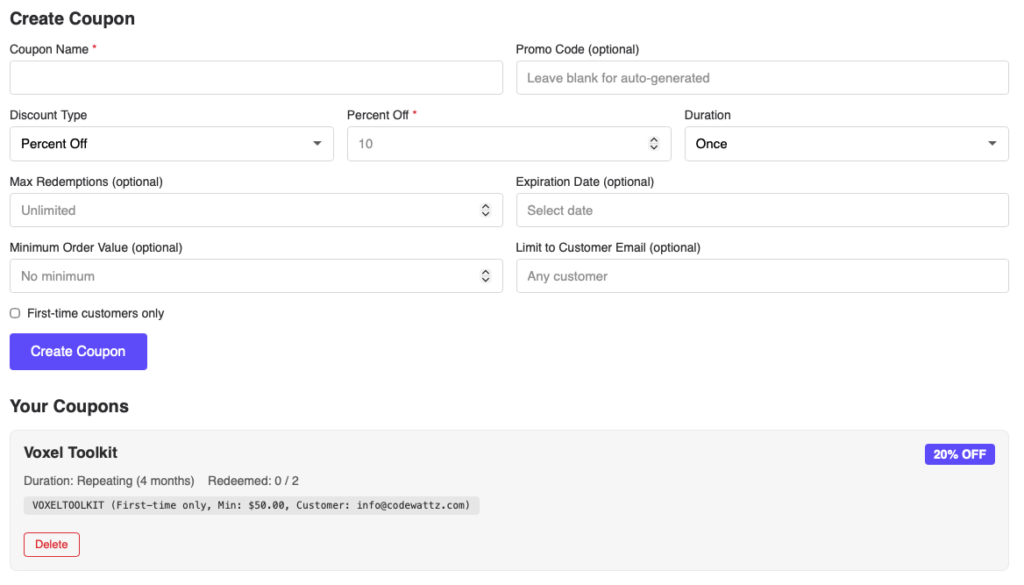
The Coupon Manager widget enables users to create and manage Stripe discount coupons directly from the frontend. Perfect for vendors, store owners, and marketplace sellers who need to offer promotional discounts to their customers.
This Elementor widget integrates with Stripe’s coupon system to allow logged-in users to create, view, and delete discount codes. Coupons are created directly in Stripe and can be used at checkout for products and services on your Voxel site.
Before using the Coupon Manager widget, ensure the following:
| Setting | Description | Default |
|---|---|---|
| Form Heading | Heading displayed above the create form | “Create Coupon” |
| List Heading | Heading displayed above the coupon list | “Your Coupons” |
| Submit Button Text | Text on the form submit button | “Create Coupon” |
| Show Create Form | Toggle visibility of the creation form | Yes |
| Show Coupon List | Toggle visibility of existing coupons list | Yes |
| Login Required Message | Message shown to logged-out users | “Please log in to manage coupons.” |
| Stripe Not Enabled Message | Message when Stripe is not configured | “Stripe payment gateway must be enabled…” |
| Field | Description | Required |
|---|---|---|
| Coupon Name | Internal name for the coupon | Yes |
| Promo Code | Customer-facing code (auto-generated if empty) | No |
| Discount Type | Percent Off or Fixed Amount | Yes |
| Percent Off | Percentage discount (1-100) | If percent type |
| Amount Off | Fixed amount in currency | If fixed type |
| Duration | Once, Repeating, or Forever | Yes |
| Duration Months | Number of months (for repeating) | If repeating |
| Max Redemptions | Total times coupon can be used | No (unlimited) |
| Expiration Date | Date when coupon becomes invalid | No |
| Minimum Order Value | Minimum cart total required | No |
| Customer Email | Restrict to specific customer | No |
| First-time Only | Only for first-time customers | No |
Allow vendors to create promotional codes for their products to boost sales and attract new customers.
Offer recurring discounts for subscription-based products using the “repeating” or “forever” duration options.
Create exclusive discount codes for loyal customers by restricting coupons to specific email addresses.
Use the “first-time customers only” option to offer special discounts to attract new buyers.