
The Campaign Progress widget displays donation and crowdfunding progress for fundraising campaigns. Show your visitors how much has been raised, the goal amount, and a visual progress bar with recent donor information.
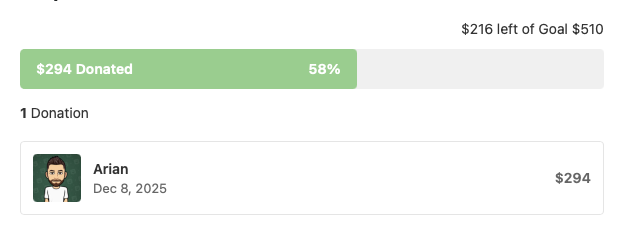
Track and display fundraising progress for campaigns, donations, or crowdfunding goals. The widget shows the amount raised, remaining amount, percentage progress, donation count, and optionally a list of recent donors with their contributions.
| Setting | Description | Default |
|---|---|---|
| Goal Amount | Target fundraising goal | 510 |
| Currency Symbol | Currency to display (£, $, €, etc.) | £ |
| Display All Data | Show all sections at once | Yes |
When “Display All Data” is disabled, you can individually toggle:
| Setting | Description | Default |
|---|---|---|
| Display Donated vs Goal | Show amount remaining text | Yes |
| Display Progress Bar | Show visual progress bar | Yes |
| Display Number of Donations | Show total donation count | Yes |
| Display Donor List | Show recent donors | Yes |
| Number of Donors to Show | How many donors to display | 3 |
Customize all text displayed in the widget:
| Setting | Description | Default |
|---|---|---|
| Donation Value Label | Label for donation value | “Donation value:” |
| Left Of Label | Text between remaining and goal | “left of” |
| Goal Label | Label for the goal | “Goal” |
| Donated Label | Text after amount raised | “Donated” |
| Donation Label (singular) | Singular donation text | “Donation” |
| Donations Label (plural) | Plural donations text | “Donations” |
| Donor Name Label | Default name when unavailable | “Platform” |
The widget displays:
Display donation progress for charitable campaigns and nonprofit organizations.
Show funding progress for creative projects, startups, or community initiatives.
Track progress toward community fundraising targets for events or improvements.
Display sponsorship collection for sports teams, events, or individual challenges.