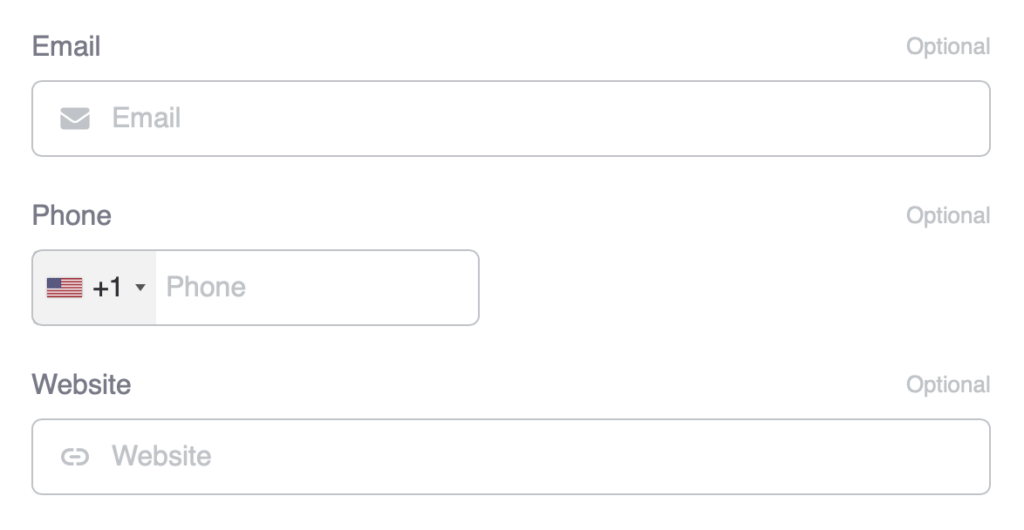
The Advanced Phone Input function enhances Voxel’s phone fields with international support. Users can select their country from a dropdown with flags and dial codes, making it easier to enter phone numbers correctly.
Overview
Phone numbers vary significantly by country – different formats, different lengths, different dial codes. This function adds a country selector to phone fields so users can easily select their country and enter just their local number. The country code is stored separately for proper E.164 formatting.
Key Features
Country selector dropdown with flags
Dial codes displayed (+1, +44, +81, etc.)
Per-field default country setting
Country restrictions per field
Toggle for dropdown visibility
E.164 format storage
Setup Instructions
Step 1: Enable the Function
Navigate to Voxel Toolkit > Functions in your WordPress admin
Find Advanced Phone Input in the list
Toggle the switch to enable the function
Click Save Changes
Step 2: Configure Phone Fields
Configure settings for each phone field in your post types:
Go to Voxel > Post Types
Edit a post type with phone fields
Click on a phone field to edit it
Find the Advanced Phone settings section
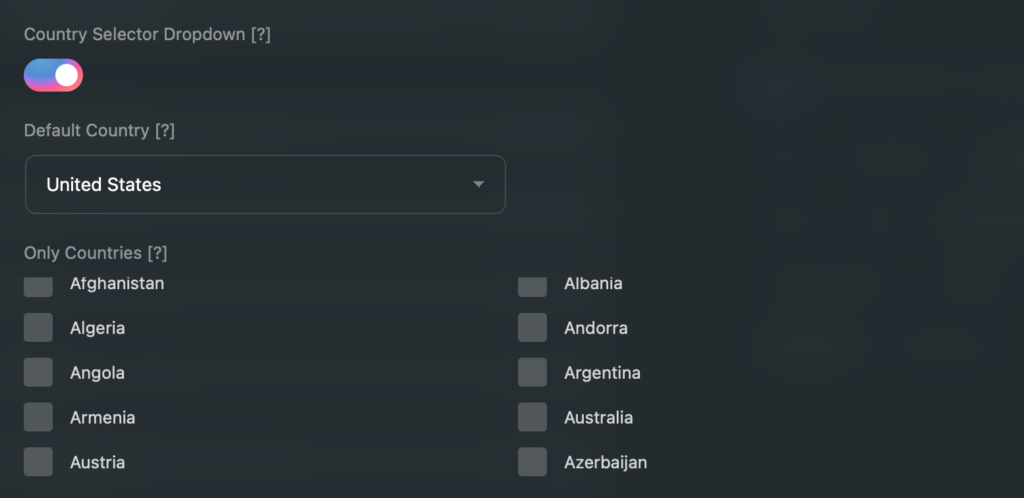
Configure default country and restrictions
Save the post type
Field Settings
Each phone field can be configured with these settings:
Setting
Description
Default
Show Country Selector
Enable/disable the country dropdown
Enabled
Default Country
Pre-selected country when field is empty
United States
Allowed Countries
Restrict to specific countries only
All countries
Country Selector
The country selector dropdown shows:
Country flag
Country name
Dial code (e.g., +1, +44)
Users can:
Search by typing country name
Scroll through the list
Click to select
Country Restrictions
If your site only operates in certain countries, you can restrict the country selector to show only those countries.
Example Use Cases
US-only business – Only show United States
European service – Show only EU countries
Regional directory – Show neighboring countries
Data Storage
Phone numbers are stored with the country code for proper formatting:
Country code – Stored separately (e.g., “1” for US)
Phone number – The local number entered by user
Full number – Combined in E.164 format (e.g., +14155551234)
E.164 Format
E.164 is the international standard for phone numbers:
Starts with + and country code
No spaces or special characters
Maximum 15 digits
Example: +14155551234
Use Cases
International Directories
Allow listings from any country to enter phone numbers correctly.
Contact Forms
Make it easy for international visitors to submit their contact info.
User Profiles
Let users enter their phone number with proper country code for SMS notifications.
Booking Systems
Collect properly formatted phone numbers for booking confirmations.
Troubleshooting
Country Selector Not Appearing
Check that the function is enabled
Verify “Show Country Selector” is enabled on the field
Clear caching and refresh the page
Wrong Default Country
Check the field’s Default Country setting
Save the post type after making changes
Missing Countries
Check if country restrictions are set on the field
Clear restrictions to show all countries
Phone Number Not Saving Correctly
Ensure the country is selected before entering number
Enter only the local number (without country code)